Solving Issues & Earning Rewards
Drips Wave turns open-source contribution into a structured, rewarding experience. As a contributor, you can browse curated issues from top-tier ecosystems, apply to work on them, and earn rewards based on your impact.
By participating in a Wave, you can:
- Earn: Receive a share of the reward pool for every confirmed contribution.
- Build: Create a verifiable portfolio of work in top-tier ecosystems.
- Connect: Engage directly with maintainers and established projects.
Getting Started
Before you can apply for any issue, you'll need to verify your identity — this is required so that you can withdraw any rewards you earn later without delays.
- Sign In: Go to the Drips Wave app and log in with your GitHub account.
- Verify your identity: Navigate to Settings → Profile and follow the instructions to complete identity verification (KYC). See Verifying your identity below for details.
- Withdrawing rewards: Once contributions have been tallied after a Wave ends, you'll be able to withdraw any earned rewards to a wallet. See Withdrawing Your Rewards for detailed instructions on how to set up your wallet and request payouts.
Verifying your identity
Before you can apply to any issue in a Wave, you'll need to complete a quick identity verification (KYC). We ask for it upfront so that, once you've earned rewards by completing an issue, there are no delays when it's time to withdraw — KYC is a regulatory prerequisite for receiving any funds.
How to verify
- Sign in to the Drips Wave app.
- Open Settings → Profile, or follow the Verify identity prompt that appears after you log in or try to apply to an issue.
- Complete the verification flow with our partner Sumsub. You'll need a photo of a government-issued ID, a short selfie, and a proof of address — a recent bank statement or utility bill that shows your full name and address works well.
Most contributors finish in under five minutes, and verification is typically approved automatically within minutes. We'll notify you by email when your status changes.
If verification doesn't go through
If verification fails and is marked as retryable, you can restart the flow from Settings → Profile. If it's permanently rejected, reach out at [email protected] and we'll help you sort it out.
Identity documents are handled by our verification partner under their own privacy policy. Drips only stores the verification result, not the documents themselves. Learn more in our privacy policy.
Finding Work
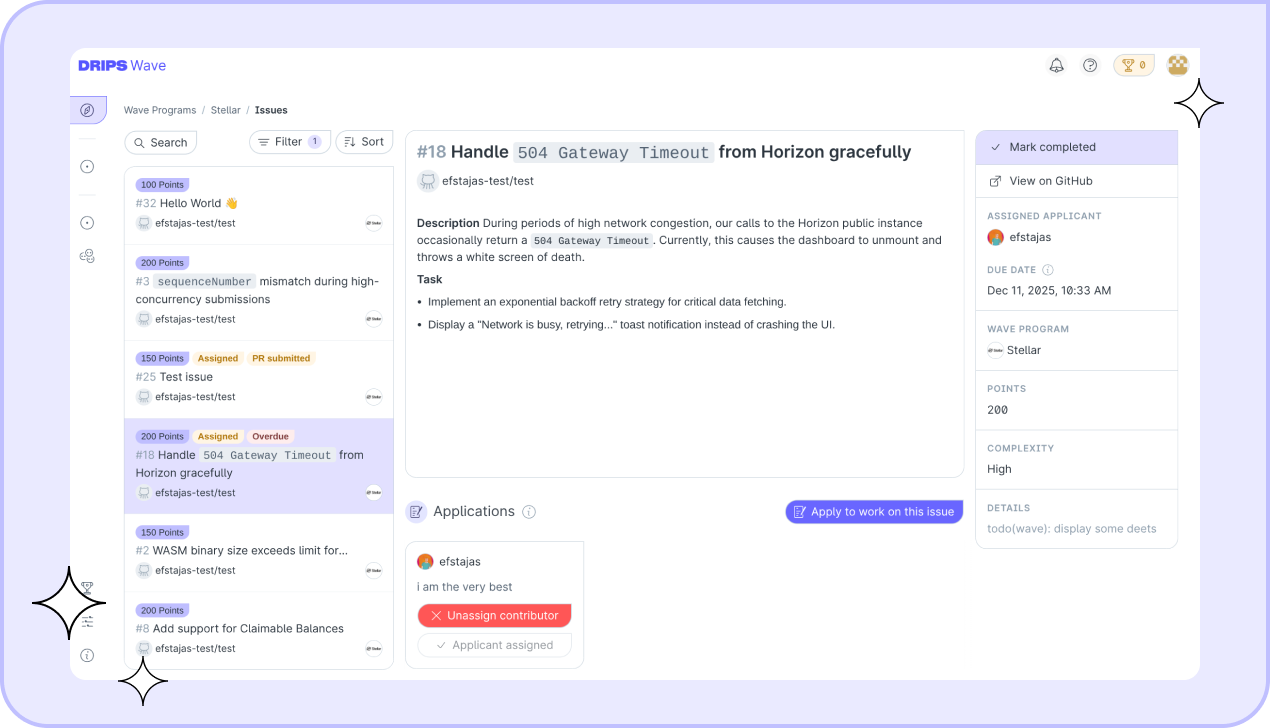
Once your profile is ready, navigate to the Explore page. Here you will see active Wave Programs (e.g., Stellar) and their currently running Waves.
Each Wave card displays the Reward Budget (the total pot available) and the Time Window (when the sprint ends). Click the "Issues" button on the Wave Program view to jump into a list of available issues. You can filter this list to only show unassigned issues, or issues without any applications.
Applying for an Issue
When you find an issue that matches your skills:
- Read the Scope: Ensure you understand the requirements and can complete the task within the Wave's timeframe.
- Check the Value: Note the issue's complexity (Trivial, Medium, or High), which determines its Points value.
- Submit your application: This signals your intent to the maintainer.
Application Limits
To ensure fair access to issues and encourage contributors to focus on completing their current work, the following limits apply:
- Pending Application Limit: You can have up to 15 pending applications at a time. You can "free up a slot" by resolving an issue you've been accepted for, or withdrawing pending applications. Applications for issues that are resolved or cancelled don't count toward this limit.
- Per-Organization Limit: You can be assigned to at most 4 issues per organization across a single Wave. This prevents any single contributor from monopolizing issues within one ecosystem and gives more people the opportunity to participate.
You can always check on which issues are currently counting against your limits for a specific Wave Program on your application limits dashboard.
Automated Limit Release
When you submit a PR and link it to a Wave issue (e.g., by including Closes #\<issue_number\> in your PR description), the Drips Wave bot may automatically perform a high-level review of your PR. If deemed to be a substantial contribution and adequately resolve the issue, it may automatically exclude the linked issue from your application limit, allowing you to already apply for one more additional issue while still awaiting a review.
Please note that this AI-assisted functionality is experimental. The bot may not always assess every PR, and there is currently no way to manually request an automatic limit release.
You can find out which of your applications no longer count against your limit on your application limits dashboard.
Writing a Strong Application
Maintainers often receive multiple applications for a single issue. To stand out:
- Be Concise: Keep your application message short and professional.
- Show Relevance: Briefly mention why you are a good fit (e.g., "I have experience with this library" or "I fixed a similar bug in repo X").
When you apply, maintainers see your Code Metrics scorecard and Languages profile next to your application. For details on how these metrics are calculated, see Applicant metrics.
The Contribution Workflow
1. Assignment
Applying notifies the maintainer of your interest.
- Wait for Assignment: Do not start coding yet! The issue is only yours once the maintainer officially assigns you. You will receive a notification when this happens.
- Check Your Dashboard: You can track all your applications and active assignments in the Contributors → Issues dashboard.
2. Solving the Issue
Once assigned, work on the issue as you normally would.
- Fork the repository (if necessary).
- Create a branch and write your code.
- Open a Pull Request (PR) on GitHub.
3. Review and Resolution
The maintainer will review your PR. They may request changes. Once the maintainer is satisfied, they will Merge your PR and mark the issue as Resolved in Drips.
This is the moment you earn your Points.You will receive an in-app notification confirming the award. You can also track your total earnings and view a detailed log of every point awarded on the Points History screen.
After the issue is resolved, you'll have 14 days to leave an anonymous review of the maintainer. See Reviews below for details.
Understanding Rewards
Your financial reward is calculated based on the Points you earn relative to all other contributors in the Wave.
How Points Work
Every issue has a base value based on complexity:
- Trivial: 100 Points
- Medium: 150 Points
- High: 200 Points
Reviews
After an issue you worked on is resolved, both you and the maintainer can leave a two-way review within 14 days of the issue being closed. Reviews are a way to provide feedback on the collaboration and help build reputation across the ecosystem.
As a contributor, you can rate the maintainer on:
- Communication Quality — How well did the maintainer communicate expectations, feedback, and decisions?
- Issue Clarity — How clear and well-defined was the issue description and its requirements?
- Repo Code Quality — How well-organized and easy to work with was the repository's codebase?
- Timeliness — How responsive was the maintainer when reviewing PRs and answering questions?
You'll also select an Overall Experience rating ("Below expectations", "Alright", or "Exceeded expectations") and can optionally leave a written comment. Star ratings for individual categories are optional.
Similarly, the maintainer can review you on Communication Quality, Code Quality, Timeliness, and Problem Solving.
The Leaderboard
You can view the Leaderboard by navigating to Wave Program → Leaderboard. This shows your real-time standing against other participants. Since the reward pool is shared, your final payout depends on your percentage of the total points earned by the community during the Wave.
Payouts
When the Wave cycle concludes:
- Calculation: The leaderboard is finalized and each contributor's share of the total points awarded during the Wave is calculated.
- Distribution: If you are eligible for rewards, you'll be able to claim your reward in the Drips Wave App. You'll receive an email notification when your rewards are available. See Withdrawing Your Rewards for details on how to claim and withdraw your earnings.