Withdrawing Your Rewards
After a Wave ends and your contributions have been evaluated, your earnings are converted into Reward Grants. Each grant represents a portion of the reward pool you've earned, payable in USDC on the Stellar network. When a new grant is available, you'll receive a notification email.
This guide walks you through the process of withdrawing your rewards to your Stellar wallet.
Prerequisites
Before you can withdraw rewards, you must:
- Complete KYC Verification: Navigate to Settings → Profile and complete the identity verification process. You cannot withdraw any funds until your KYC status is approved.
- Have a Stellar Wallet: You'll need a Stellar wallet that supports USDC. Popular options include LOBSTR (mobile app), Ledger (via Ledger Live or compatible wallet), or any other wallet compatible with the Stellar network. You can also withdraw to a centralized exchange, provided it supports USDC deposits specifically on the Stellar network.
- Activate the wallet and enable the USDC Trustline:
- Activation: Your wallet must hold a small minimum balance of XLM (Stellar Lumens) to be active.
- Trustline: You must explicitly enable the "USDC" asset for your wallet (this is called "setting a trustline"). Instructions for enabling USDC on the popular LOBSTR wallet can be found here. Please ensure to enable the "real" USDC asset, issued by Circle (issuer address:
GA5ZSEJYB37JRC5AVCIA5MOP4RHTM335X2KGX3IHOJAPP5RE34K4KZVN), and not any similarly named assets from other issuers. - Exchange Users: If you are withdrawing directly to an exchange that supports USDC deposits on Stellar, the exchange's wallet generally already holds XLM and the trustline. You typically don't need to set this manually, but you must provide the correct Memo with your withdrawal request.
Viewing Your Grants
To view your reward grants:
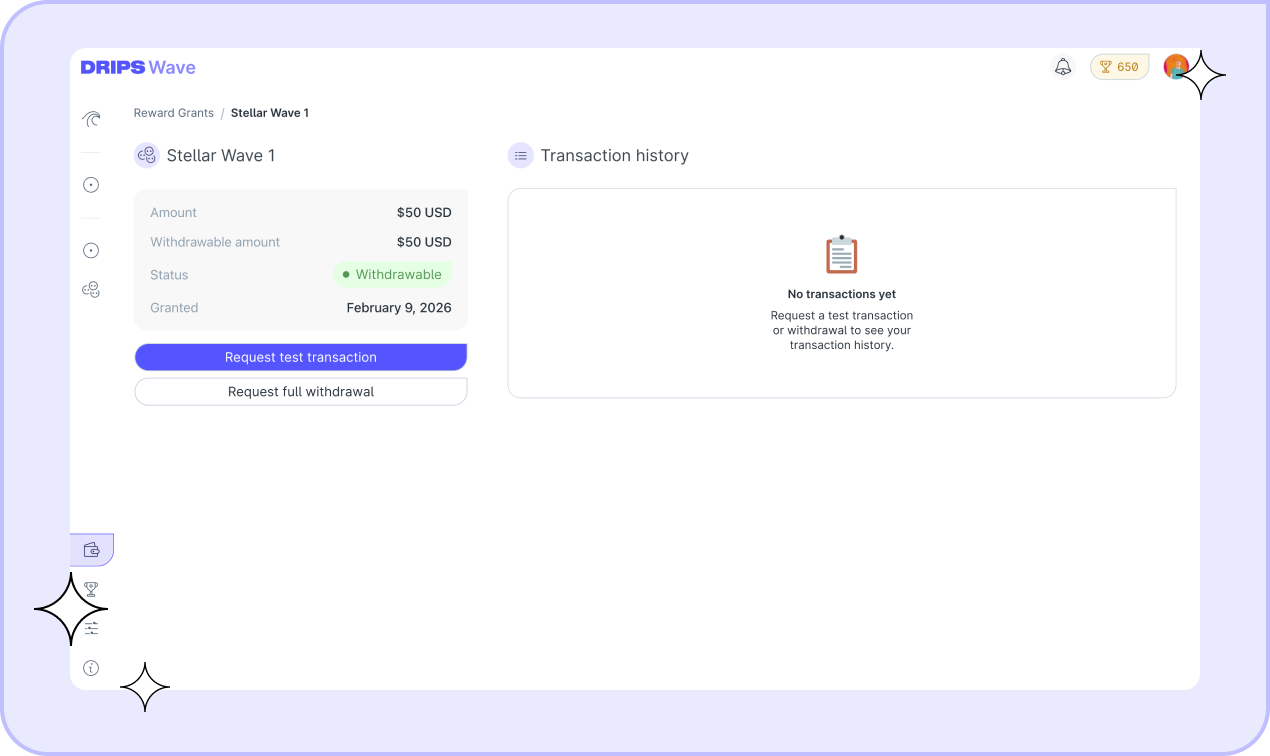
- Navigate to Wave → Reward Grants in the Drips Wave app.
- You'll see a list of all your grants, showing the Wave program name, amount, and current status.
Click on any grant to view its details, including the full transaction history for that grant.
Grant Statuses
Each grant has a status indicating where it is in the withdrawal process:
| Status | Description |
|---|---|
| Withdrawable | The grant is ready. You can request a test transaction or full withdrawal. |
| Test Requested | A $1 test transaction has been requested and is being processed. |
| Test Sent | The test transaction has been sent on-chain to your provided address. Please verify receipt in your wallet before proceeding. |
| Withdrawal Pending | A full withdrawal has been requested and is being processed. |
| Withdrawal Complete | The full amount has been sent to your wallet. |
The Withdrawal Process
We recommend a two-step withdrawal process to ensure your wallet is correctly configured:
Step 1: Request a Test Transaction
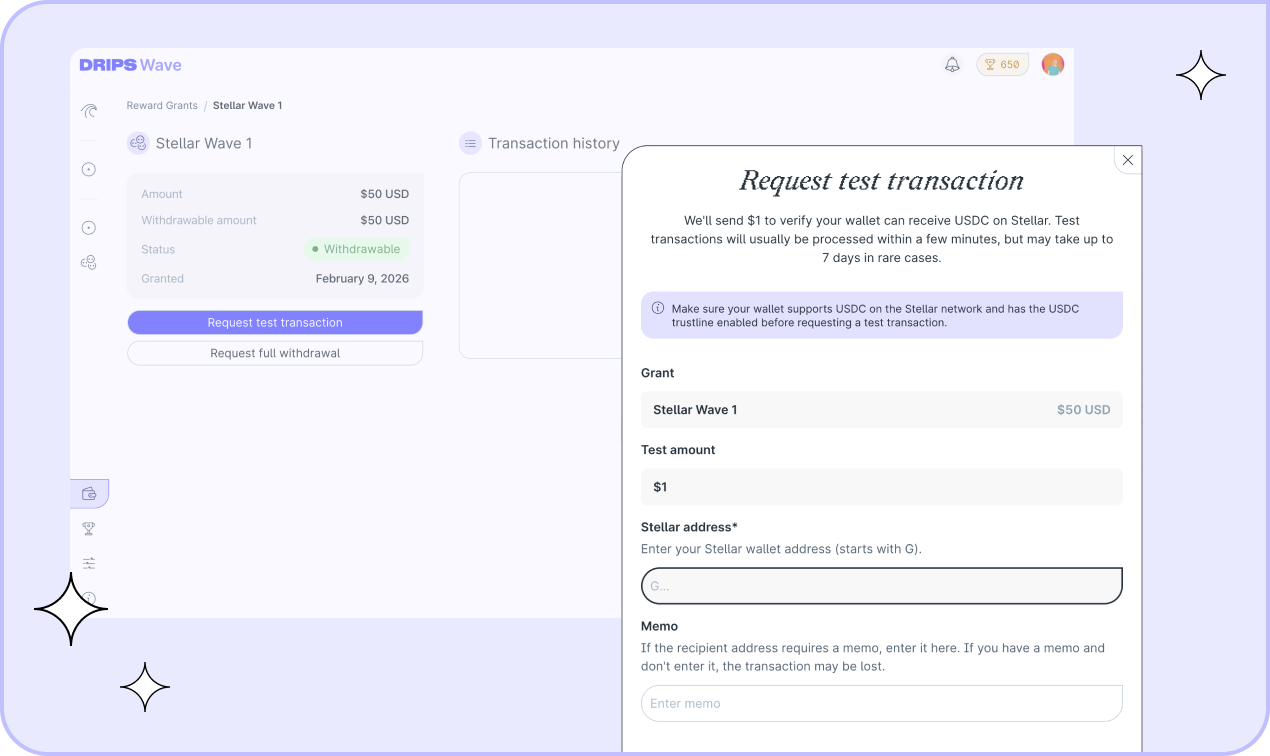
Before withdrawing your full grant amount, we strongly recommend requesting a test transaction first. This sends $1 from your grant balance to your wallet to verify everything is set up correctly.
- From the grant details page, click Request test transaction.
- Enter your Stellar wallet address (starts with
G). - If your wallet or exchange requires a memo, enter it in the memo field. This is common for centralized exchanges.
- Review the details on the confirmation screen and check the box to confirm you understand the terms.
- Click Confirm to submit the request.
The test transaction has now been requested. It's usually sent within a few minutes, but in rare cases may take up to 3 days.
Step 2: Request Full Withdrawal
Once your test transaction has been successfully received:
- Return to the grant details page and click Request full withdrawal.
- Your wallet address and memo from the successful test transaction will be pre-filled for convenience.
- Review all details carefully on the confirmation screen.
- Check the confirmation box to acknowledge the terms and conditions.
- Click Confirm to submit your withdrawal request.
Processing Time
Test transactions are usually sent within a few minutes, but in rare cases may take up to 3 days. Full withdrawals are usually processed within 1–3 business days. You'll receive an email notification when your transaction has been completed. If your transaction is taking longer than expected, please check the transaction history for any updates or contact our support team.
Transaction History
Every grant maintains a complete transaction history. From the grant details page, you can view:
- Transaction type: Test or Withdrawal
- Amount: The USD value of the transaction
- Destination: The Stellar address (hover to see full address and copy)
- Memo: The memo included with the transaction, if any
- Status: Pending, Complete, or Cancelled
- Requested date: When you submitted the request
- Completed date: When the transaction was finalized (if complete)
- Transaction hash: A link to view the transaction on Stellar Expert (if complete). This link serves as proof that the funds were sent on-chain.
Troubleshooting
My test transaction failed or didn't arrive
- Check Minimums: If withdrawing to an exchange, did the $1 transaction meet their minimum deposit requirement? (It may be credited only after you deposit enough to reach the threshold).
- Check Address/Memo: Verify your wallet address is correct and you provided the correct memo, if required.
- Check Trustline: Ensure you have not removed the USDC trustline since requesting the transaction.
- Check XLM Balance: Check that your wallet is funded with enough XLM (Stellar requires a minimum balance of Lumens for accounts to receive other assets).
I sent to the wrong address
If your transaction is still pending, cancel the withdrawal on your Reward Grants Dashboard and contact our support team immediately. If it has already been completed, unfortunately, it cannot be reversed due to the nature of blockchain transactions.
My exchange requires a memo but I forgot to include one
If your transaction is still pending, cancel the withdrawal on your Reward Grants Dashboard and contact our support team immediately. If it has already been completed, unfortunately, it cannot be reversed due to the nature of blockchain transactions.
In this case, please contact your exchange's support team as soon as possible. Exchanges may be able to manually credit deposits that are missing memos, but this is not guaranteed.
My grant expired
Grants have an expiration date. If you don't withdraw before this date, you may forfeit your rewards. Check the grant details page for the expiration date and ensure you complete the withdrawal process in time.
Frequently Asked Questions
Why do I need to verify my identity (KYC)?
KYC (Know Your Customer) verification is required for regulatory compliance. We cannot process any withdrawals without completed identity verification.
Can I withdraw to any wallet?
You can withdraw to any Stellar wallet that supports USDC on Stellar and has the USDC trustline enabled.
Can I withdraw directly to a centralized exchange?
If the exchange supports direct USDC deposits on the Stellar network, yes. However, you must always include the correct memo (if provided by your exchange) with your withdrawal request. Exchanges use memos to credit incoming transfers to the right account. Always check your exchange's deposit instructions carefully to ensure USDC-Stellar support is available in your region. We recommend requesting a test transaction first to ensure the address and memo are correct.
What currency are rewards paid in?
All rewards are paid in USDC (USD Coin) on the Stellar network.
Is there a minimum withdrawal amount?
If you received a grant, you can withdraw it either in full or request a test transaction of $1 first. Partial withdrawals of amounts other than $1 or the full grant amount are not supported.
Can I change my wallet address after requesting a withdrawal?
While a withdrawal request generally cannot be changed once submitted, if you realize you made a mistake before it is processed, please contact our support team immediately.
What if I have multiple grants?
Each grant is managed independently. You can request tests and / or full withdrawals for each grant separately.