Participating in a Wave
As a Project Maintainer, Drips Wave allows you to leverage your community to accelerate development. By identifying "good first issues" or critical maintenance tasks, you can attract contributors who are ready to build. Participation is entirely free for maintainers, and Wave Organizers (e.g. the Stellar Development Foundation) provide a funding pool to reward contributors for their work, allowing you to incentivize contributions without impacting your budget.
To participate, you join a Wave Program (e.g., the Stellar Wave Program). A Program is a long-running initiative that spawns recurring Waves (sprints). You add issues to the Program, and they become available for contributors to tackle during the next active Wave.
Setting Up Your Organization
To participate, you must first onboard your GitHub organization and apply your repositories to a Wave Program.
- Sign In: Go to the Drips Wave app and log in with your GitHub account.
- Navigate to Onboarding: In the main navigation, select Maintainers → Orgs and Repos.
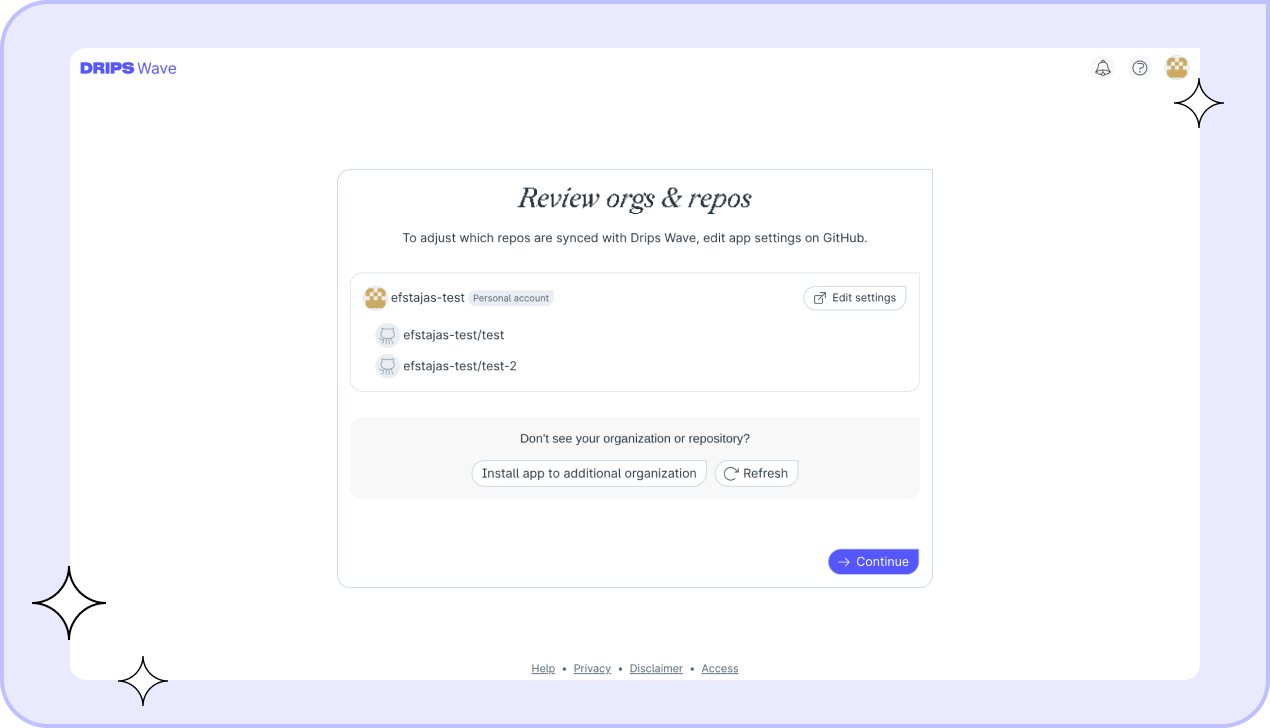
- Install the App: Follow the prompts to install the Drips Wave GitHub App on the organization hosting your repositories. This allows Drips to track issues and labels.
- Sync and Apply: Select the public repositories you wish to sync. You must explicitly apply these repositories to a specific Wave Program. Only apply to Programs that are relevant to your ecosystem.
- Wait for Approval: Repository applications require approval from the Wave Program organizers. You will receive an email and an in-app notification once your repositories have been accepted. You can also check the status of your application at any time on the Maintainers → Orgs and Repos dashboard.
If your repository is rejected
If your application is declined, you can appeal the decision directly from the Maintainers → Orgs and Repos dashboard — find the rejected repository and click Appeal. Everything happens in the app; there's no need to email or otherwise contact us.
When you appeal, we'll ask what development work and improvements you've made since the rejection. Appeals are only reconsidered when there has been substantive change — meaningful improvements to the code, project quality, activity, or the specific concerns raised in the review. If nothing material has changed, the decision won't change.
A few rules apply:
- You can submit your first appeal two weeks after the initial rejection.
- If an appeal is declined, there's a one-month cooldown before you can appeal again.
- Each repository can be appealed a maximum of three times.
A rejected repository cannot be re-applied — appealing is the only way to have the decision reconsidered.
Adding Issues to a Wave Program
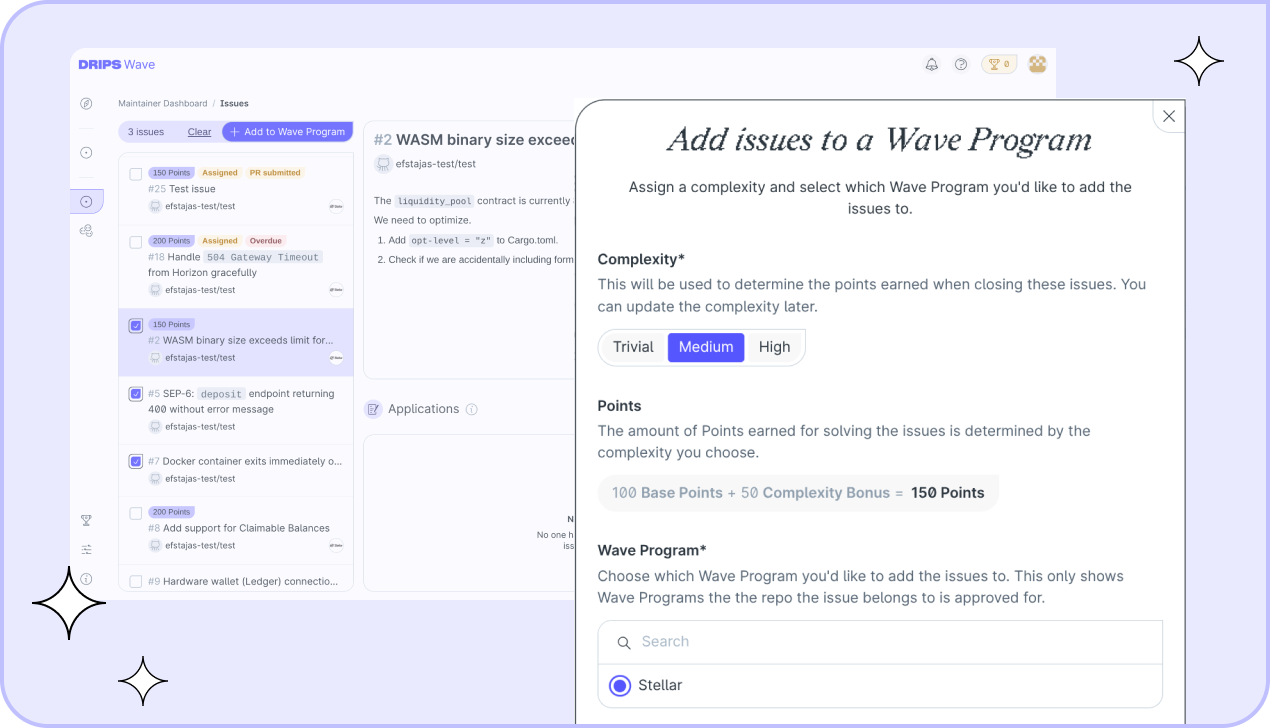
Once your repository is approved, issues from that repo will appear in your Maintainers → Issues dashboard. From here, you can select which issues to add to the Wave Program.
Setting Complexity and Points
When adding an issue, you must assign a complexity level. This determines the total Points a contributor earns for resolving it:
- Trivial: Worth 100 Points (Base). Best for typos, small bug fixes, or minor copy changes.
- Medium: Worth 150 Points (Base + 50 Complexity Bonus). Standard features or involved bug fixes.
- High: Worth 200 Points (Base + 100 Complexity Bonus). Complex features, refactors, or new integrations.
The GitHub Label Workflow
Alternatively, you can manage issues directly from GitHub without leaving your code.
When an issue is added to a Program, the Drips Wave bot will post a comment and apply a label (e.g., Stellar Wave). You can also add an issue to a Program simply by applying this label yourself on GitHub. This only works if the repository has already been approved for that specific Wave Program.
During a Wave
As soon as a Wave cycle begins, contributors can start applying to work on the issues you have added to the Program. You will be notified via email and in-app notifications when you receive applications.
Assigning Contributors
Speed is critical. Maintainers are urged to review applications and assign contributors quickly to ensure they have enough time to resolve the issue before the Wave ends.
When reviewing applicants, you will see a Code Metrics scorecard and Languages profile sourced from their GitHub activity. This includes metrics like Total Merged PRs, PR Merge Rate, and an OSS Activity Score, with categorical bins comparing the contributor against ~3.9 million GitHub users. For details on how these metrics are calculated, see Applicant metrics.
You can accept an application in two ways:
- Via Dashboard: Use the Maintainers → Issues dashboard to view applicant stats and accept one.
- Via GitHub: Simply assign the contributor to the issue directly on GitHub.
Explicitly rejecting an application
Usually, you do not need to explicitly reject applications. When you assign an applicant, all other pending applications for that issue are automatically marked as "inactive", resulting in them no longer counting toward the contributor's application limits.
However, if you have received several applications already, but none of them fit your needs, consider explicitly rejecting those applicants. This allows the contributors to immediately know they won't be working on that issue, so they can focus on applying to other issues instead of waiting for a response from you. To reject an application, simply click the "Reject" button on the application card.
Tracking Progress
The Maintainers → Issues dashboard is your central hub. It allows you to filter and quickly see:
- Issues with pending applications.
- Issues with open Pull Requests requiring review.
- Issues that are assigned but stale.
Resolution and Rewards
When a contributor submits a Pull Request, you review and merge it as normal. Once the issue is marked as resolved during an active Wave, the contributor earns the Points allocated to that issue.
Leaving Reviews
After an issue is resolved, both the maintainer and the assigned contributor can leave a two-way review within 14 days of the issue being closed. Reviews help build reputation and improve collaboration across the ecosystem.
How It Works
Each review consists of:
- Overall Experience (required): Rate the collaboration as "Below expectations", "Alright", or "Exceeded expectations".
- Category Ratings (optional): Rate specific aspects on a 1–5 star scale.
- Comment (optional): Provide open-ended feedback (up to 5,000 characters).
The specific rating categories depend on your role:
When a maintainer reviews a contributor:- Communication Quality — How well did the contributor communicate progress, questions, and blockers?
- Code Quality — How clean, well-structured, and maintainable was the contributor's code?
- Timeliness — How responsive was the contributor while working on this issue?
- Problem Solving — How well did the contributor handle challenges and find solutions independently?
- Communication Quality — How well did the maintainer communicate expectations, feedback, and decisions?
- Issue Clarity — How clear and well-defined was the issue description and its requirements?
- Repo Code Quality — How well-organized and easy to work with was the repository's codebase?
- Timeliness — How responsive was the maintainer when reviewing PRs and answering questions?
You can update your review at any time before the 14-day deadline. After the deadline passes, reviews can no longer be submitted or changed.
Issue Rollover
If an issue is added to a Wave Program but is not resolved during the current Wave, it automatically remains in the Program. It will be eligible for applications again in the next Wave cycle unless you explicitly remove it.